Showing posts with label xenserver. Show all posts

Thursday, September 11, 2014

360is Builds VDI for InnovateUK

UK Satellite and GIS Imagery
The UK Satellite Applications Catapult (The Catapult) was established to promote growth in commercial applications of satellite technology. Its mission is to accelerate the take-up of emerging technologies by businesses and in so doing, drive UK economic growth. The Catapult offers expertise and facilities that will bring strategic benefit to the community of industrial companies working in the sector.  

How did the project come about? 
Making facilities and information assets easily available to potential users of their services is part of the Catapult's mission. Satellite analysts routinely work with heavyweight applications like ESRI ArcGIS, GE Smallworld, and Raytheon VIIRS. The Catapult wanted to see how such applications performed on a modern, fluid, Virtual Desktop Infrastructure (VDI). 360is was challenged to build a system capable of multi-user, multi-screen VDI for satellite applications using thin clients while providing a dedicated workstation-like experience.

What did 360is do?
After interviewing end users, 360is built a VDI system using Citrix XenDesktop, XenServer, and NVIDIA GPU hardware and a suitable WYSE thin client. This combination of technologies allowed for maximum flexibility.
  • Physical GPUs may be partitioned into virtual GPUs Virtual Desktops are booted on demand.
  • Users are allocated VDI's with different vCPU/vGPU capabilities depending on a profile.
  • The platform may be optimised for user density or performance.
  • Server GPUs work with client GPUs to enable a high-quality end user experience.
  • Network bandwidth is minimised using caching and compression.
As this was a proof of concept demonstration, 360is chose components and settings for maximum stability. End users can quickly form a negative opinion if a new technology is not completely reliable and this system was to be used for live demonstration.

How successful was the platform in meeting the project goals?
Multi-screen multi-user GPU VDI was delivered. 0.5Mb/s to 1.0Mb/s of network bandwidth was required per client while running in excess of 60fps. Up-to 64 concurrent GPU-powered VDI's could be provided by the system, this could be increased to 128 with different choices of hardware. The thin client CPU (capable of driving up-to 6 monitors) proved to be the limiting factor. High-density, GPU VDI is now within the reach of most organisations. Specialist scientific applications no-longer need to be excluded from the virtual desktop projects.

About 360is
360is builds multi-user, multi-monitor, high-resolution and GPU-enabled Virtual Desktop Infrastructure for Scientific Technical and Creative Industry organisations. Our engineers can address all aspects of the project from storage, to networking, to hypervisor configuration and application performance tuning. If you would like to talk to one of our engineers about deploying scientific and GPU applications to demanding users, get in touch via our contact page, Email, or message us on twitter.

If you want to know more about the UK's Satellite Applications Catapult and the great work they are doing to help grow the £7B annual turnover of the UK space sector, take a few minutes to find out more:

Tuesday, July 15, 2014

XenServer Creedence Alpha 3, Disk I/O testing (part 2)

We did some more testing of XenServer Creedence Alpha (XSCA3) disk performance, and plotted large streaming reads for a variety of record sizes against both a physical and Brand-X Hypervisor.

Recap:
  • System is an AMD6176SE, 2 CPU, 192GB RAM 
  • Local storage, 3x 10Krpm SATA, LSI 9261-8i, RAID0, thick provisioned 
  • No special settings, tuning, or configuration 
  • Testing is with dd and iozone, with and without Direct I/O (dd iflag=direct, iozone -I)
  • CentOS 6 2 vCPU, 2GB vRAM (updated 3-07-2014) VM and physical 
  • The system was idle 

Physical achieves ~600MB/s transfer speed. 
Brand-X achieves a similar figure.
XSCA3 achieves less than 50% of that, unless Direct I/O is used.
Neither physical nor Brand-X are significantly affected by use (or not) of Direct I/O.


Results for physical without Direct I/O are excluded as with 192GB RAM and only 8GB of test data, transfer rates are in the 2500-1700 MB/s range due to the abundance of RAM for cache. We took no steps to limit the physical CentOS to 2 cores either.
  

We know the disappointing XenServer performance is only for asynchronous (not Direct I/O) disk access, and that the system behaves as expected when running physical or Brand-X hypervisor. The mystery deepens!

Thursday, July 03, 2014

XenServer Creedence Alpha 2, Disk Performance


360is gets paid to make information technology go faster.

Sometimes its hardware which doesn't hit the stated performance, or software which cant fully utilise the capability of modern hardware. Sometimes it's a lifetime extension for an old platform, squeezing in another 18 months growth before a replacement arrives. If we are really lucky we get to re-design an entire end-to-end process and make it more efficient. More layers and more abstraction means more scope for performance problems, so virtualisation has been a rich seam for us. With Citrix release of XenServer Creedence Alpha 2 (XSCA2) should we be worried? Is it time to throw in the towel on IT performance-tuning and setup that high-end bicycle-shop-come-espresso-bar we've always talked about?

We've been following XenServer performance from the start, and have a tome of magic spells to instrument and improve network, storage, and CPU performance. Without resorting to black-magic we were interested in seeing how XSCA2 performed straight out of the box.

Firstly let me say that all we have time for here is the most superficial of testing. Large sequential reads and writes are the 0-60 time of the storage world. That is to say, while they have some value, unless your use-case is an out-and-out drag race this test probably isn't a good approximation of the kind of performance you will see in your applications. Single VM large sequential read/writes are even more of a corner-case. If you only had a single VM to run you should probably run physical, just a suggestion...

Secondly, XSCA2 is alpha, and so it is slightly unfair subjecting it to a performance benchmark.

Finally, we used the equipment we had spare in the lab at the time. The storage back-end is puny. We had a handful of 10Krpm spindles and SSDs laying about. Out in the real world, 360is regularly deliver 1.5GB/sec to 2GB/sec of storage bandwidth (at high IOPS) to Hypervisors and physicals of one kind or another either over local or network storage.


The Goal
We were interested to see how XSCA2 performed against XenServer 6.2, against physical, and against "Brand-X" Hypervisor, all of which were "out of the box".

The Test
The test couldn't have been simpler. For a 2 vCPU VM, for each of 9 record sizes (64KB-16MB), we write (or read) 8GB of data and measure the performance in MB/sec for each record size. Why 2 vCPUs? Adding more doesn't change the results. Why 8GB? We can be sure 8GB blows through any caching that may be happening on disks, RAID controller, VM, or Hypervisor. Even at a 16MB record size, 8GB takes a lot of writes. For the physical test case we force direct IO to get around the fact that the physical system has much more RAM than 8GB. We use the same guest Operating System, installed in the same way for each of the VM tests. Everything is thick provisioned. This isn't a test of how fast each configuration can be made to go, it is a test of how fast each actually goes, straight out of the box on the lab system that was available at the time.

Tuning
None. No changes to the default install of XenServer, Brand-X Hypervisor, the CentOS VM or physical instance, with the exception of taking XSCA2 out of debug mode. No CPU pinning, no IO scheduler changes, no disk/virtual disk alignment, no IRQ balancing, no interrupt coalescing, no filesystem tweaking, no queue size alteration, no waving of dead chickens or reciting of incantations.

Results  
Enough talk, on with the results:

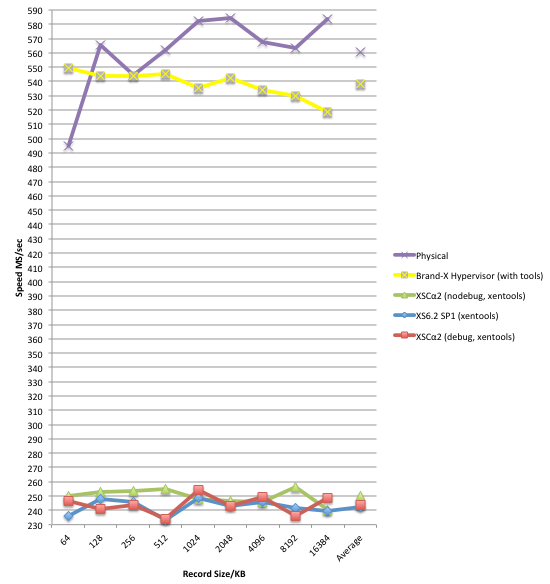
8GB Sequential Write At A Variety Of Record Sizes
8GB Streaming Write At A Variety Of Record Sizes


8GB Streaming Read At A Variety Of Record Sizes


On this system, for this test, XSCA2 is an improvement over XS61-SP1, but is still significantly behind the physical, and more disappointingly behind the other well known brand of Hypervisor. Besides the obvious, there are a few points from the chart which warrant further investigation for starters:
  • High jitter in all XS results.
  • Odd dip at the 512KB record size test on both XSCA2 and "Brand-X" hypervisor.
  • Slow start to the physical test at 64KB record size.
  The tests shown here were on a RAID0 of 3x 10Krpm spindles (maximum sustained transfer rate ~200MB/s each). Conducting the same test on a RAID0 of SSDs made little difference to the XenServer results, adding 20MB/s to the average write result and 40MB/s to the average read value.

Conclusions
  1. We aren't out of the performance tuning business just yet it seems!
  2. There is a significant difference in performance between the physical and "Brand-X" and XenServer.
  3. Read performance is particularly disappointing for XenServer in this test.

"It is easier to repair a bucket with a big hole, than an inner tube with a slow puncture." - Ancient 360is Engineer's Proverb.

For this system, for this test, the hole in the bucket is large, with a bit of further investigation it shouldn't be too hard to find. XenServer Dom0 (which strictly speaking we don't care about) comfortably achieves ~600MB/sec in read performance tested using "dd" with direct IO (no cache effect), so we know the problem is with the guest disk virtualisation IO path. First port of call will be instrumenting CPU consumption in the guest and Dom0, paying particular attention to XSCA2 susceptibility to numa-effects on the CPUs. We love a mystery. The game is afoot!


Further Information
Test VM Spec.
CentOS6 x86_64 Linux, default install from distribution, updated with "yum update" 3-07-2014, with the following additional packages: wget, openssh-clients, iozone (3.424-2 x86_64). 2 vCPUs, 1GB RAM, 20GB virtual hard disk.
Test Hardware Spec.
AMD 6176 CPUs (x2), 192GB 1066MHz RAM, LSI 9260-4i RAID, 3x WD1000DHTZ, 2x SSDSC2BW12.
Test Hardware OS.
CentOS6 x86_64 (same as VMs).
Brand-X Hypervisor.
Latest version, chose the PV SCSI device.

Benchmark.
We used the continuous benchmarking feature of VMCo Virtual Estate Manager (VEM). VEM's benchmarking alerts administrators to performance regressions in your XenServer or VMware estate, whether they be caused by bugs, patches, hardware problems, subtle interactions between network elements or administrator misconfiguration. VEM's continuous benchmarking shows you where the performance regression is, when it started, and it's impact is.


Wednesday, July 25, 2012

FreeBSD 9.0, Paravirtualized Drivers, & Xen-Tools On XenServer 6


We are often asked by clients to help them squeeze more performance from an existing infrastructure, to speed up an application or shorten an IT-dependent business process. Early on in the discussion there's a tendency for sysadmins and architects to dive in to technical minutiae, the black magic and chicken-waving of memory page sizes, block alignment, cache segmentation, and thread pinning. This is almost always a mistake at this early stage and can drain days and weeks with few results. The business gets frustrated when deadlines are missed and the techies can't answer simple questions like "when will this be fixed?", "how much sooner will I get my results?", and "what will it cost to process data within that time window?". Black magic has a time and a place, but at 360is we save our voodoo until the latter stages of a performance tuning project.

Before making non-portable, hard-to-maintain, unsupported, obscure, or fragile configuration changes that break when you least expect them (and may not even be understood by those operating the infrastructure) we start with the basics:
  • Is what you have, setup properly? Many complex multi-vendor data centres have a setup that is sub-optimal in some way.
  • Is the system already performing more-or-less as you would expect "on paper" +/-25%? We whiteboard a block diagram of devices, buses, networks, data volumes, benchmarks.
  • If it isn't then there is probably a significant configurational mistake to be found. Forget about jumbo frames if your switch is stuck in half-duplex mode.
  • Focus on the biggest wins first, they are often the easiest to achieve. Only then do we go chasing marginal gains with our consultant's Juju. Don't waste days chasing the last 3% unless that gain makes economic sense for your business process.
Where are we going with all this and what does it have to do with FreeBSD?

At 360is we are fans of FreeBSD, and regularly recommend it as a secure, low-maintenance, stable, and performant, server operating system. Unfortunately there is no official support for FreeBSD in the Citrix XenServer product. What this means in practice is that those wanting to run FreeBSD on XenServer deploy it in HVM mode and without Xen-Tools. Pure HVM mode is slow for network and disk access, and no Xen-Tools means no live migration, not good for production workloads.

Shooting for the biggest win first, we have made available a basic, paravirtualized-drivers-with-xentools-installed, FreeBSD 9.0 64-bit Template that delivers approximately twice the performance of the pure HVM install of the Operating System. No tuning, no special settings, absolutely no chicken-waving.
  • FreeBSD 9.0
  • 64-Bit (amd64)
  • Paravirtualized Drivers in the XENHVM kernel
  • Open Source Xen-Tools pre-installed
  • Small (389MB) XVA file
Bugs/Errata: Hot-adding of additional NICs works, hot-remove not so much. Use at your own risk. Please submit any other problems as comments, feedback is always welcome.

Get the FreeBSD 9.0 XenServer Template XVA, (cookies/valid Email required in order to be sent the password).

If you need to extract more performance or reliability from an existing infrastructure, application, or IT-driven process, 360is consultants know how, get in touch.

=== Update 26-07-12 ===
As we always get asked about these "relative-to" bar charts, the absolute figures were 188MB/sec for the VM derived from our template, and 92MB/sec for the ordinary install using Citrix "Other OS" template. The fast VM consumed 67% of 1 vCPU on an otherwise idle system. The physical hardware used was a VMCo VA12xx Appliance with its local IOPS sink configured as an SR.

=== Update 11-10-12 ===
This XVA was prepared for XenServer 6.0.2, and probably wont work on XenServer 6.1. If you have a commercial imperative for it on a different version of XenServer, with a different version of FreeBSD other than 9.0, or for that matter with i386 versus amd64, then get in touch with our project office.

Tuesday, August 02, 2011

XenServer & The City, London LinkedIn Group


There is now a LinkedIn group for those end users running or evaluating Citrix XenServer in the City Of London.

New members shall need to be approved before being able to post (to keep the SPAM out) but otherwise the group is open to members. Feel free to invite your colleagues and contacts. Discussions can only be read by other members of the group. This group operated for the benefit of end users, sorry vendors/resellers.

Running IT operations in one of the worlds largest financial centers puts extreme pressure on infrastructure managers:

  • Data center space is in short supply, driving up prices and driving out colocation to make way for fully managed hosting customers. Hosting offers higher margins and reduced churn rates to service providers, but does not suit everyone.
  • Power demand continues to outstrip supply as it has done for years. Although there is some hope this will improve after 2012. Lack of power in London has been a recurring problem!
  • Cooling. Due to the Urban Heat Island effect, central London can be up to 10 degrees warmer than the surrounding area. This places further strain on cooling plant and equipment. We have just entered what is traditionally the warmest month.

These factors have driven city sysadmins to ever more dense virtualisation and higher levels of utilisation. However, maintaining mission critical systems under such conditions is a challenge.

The XenServer City Of London Group activities outside LinkedIn will likely include occasional informal get-togethers (yes, that means drinks), briefing sessions, peer talks, and perhaps even collaborative projects. The group will also provide leverage for pushing bug fixes and feature requests back into Citrix Engineering through our longstanding relationship with the development teams.

As with any user forum, you get out what you put in.
In other words "ask not what this group can do for you, but what you can do for this group".

Monday, August 01, 2011

Maximising VM Density

Maximising Virtual Machine Density is one of the few topics that is of interest to both engineers and business managers alike. With recent announcements from VMware, even Procurement and Finance Directors have reason to show an interest in this subject.

Being able to run a very large number of Virtual Machines on a very small number of physical hardware platforms (servers, switches, storage, racks) requires a high degree of technical skill and great operational discipline. Not every IT team has both in the the right measures.

For business managers, VM density may be directly linked to profitability (hosting, cloud, or something-as-a-service providers). For other kinds of company, VM density may be just another marginal competitive advantage among many, rather than an outright ace.

One thing we can be sure of, for companies using our favorite metric (IT Head Count to Free Cash Flow), increasing VM density can be a primary ratchet for achieving operational efficiency. It is the essence of "doing more with less", and can link IT performance to business outcomes.

360is consultants regularly work with our clients to maximise their VM density, either as part of a performance tuning exercise or a new-build data center project. We were recently invited to present on the subject of maximising VM density at the Citrix XenServer UK User Group's regular meeting in Cambridge. We covered:

  • Hardware Selection, down to the component level
  • Hypervisor Configuration (we limited things to XenServer)
  • Performance Monitoring
  • Operational Practices

Delegates from some of the UK's largest companies were present, along with a mixture of hosting service providers, government, and educational establishments. We were pleased to see a few familiar faces from our own client list.

For those of you who could not make the event, you may obtain the slides in PDF form here. If you had not previously registered for the event then you will have to enter your Email address in order to access them.

If you would like to speak to one of our consultants about increasing VM density in your data center, or you would like to register for the next event, then please get in touch.


--- Update 25-07-2011 18:20:21
The application shown on the slides displaying performance and capacity planning information is the Virtual Estate Manager, which is part of VMC's high density virtualisation appliances.

Tuesday, September 14, 2010

Citrix XenServer Certified at EAL2 Common Criteria

Back in April we discussed XenServer's recent submission to the Common Criteria (CC) scheme. Based upon previous evaluations, we predicted a 6-month end-to-end process. True to form the guys at SiVenture have delivered on time.

As is common with other virtualization technologies that have been through the CC process, the investigation work centered around separation of virtual machines, their memory, virtual disks, and execution on the CPU(s). The method of secure administration was also investigated.

This is good news particularly for those UK Government buyers who need a CC approved virtualization platform that will help to reduce OPEX through lower power consumption and CAPEX though XenServer's lower license cost.

There is going to be a lot more white space on this chart in 2011-2012 than there was in 2007-2008 when it was compiled, so a lower-cost method of virtualization will be a welcome addition to the procurement department's product list.

Wednesday, April 14, 2010

Citrix XenServer & VMware ESX Common Criteria Certification

As some of you already know, Citrix have sponsored XenServer, XenDesktop, XenApp, and Netscaler into the Common Criteria program for Information Technology Security Evaluation (CC). We have had several questions about the announcement and what it means for both VMware and XenServer in particular. Since 1 or 2 of us at 360is were there way-back when Common Criteria & ITSEC first started seeing mainstream IT products submitted for evaluation, we thought we would take this chance to answer some of your questions in this posting.

What is Common Criteria (CC)?
CC is an attempt to reduce duplication of effort of the IT security evaluation functions of several governments (6 in all). CC is an international standard that describes how product vendors may make claims about their security software or hardware, and have independent laboratories investigate these claims and certify the product has been designed and built in a way that meets the vendors claims and can be relied upon to function as described.

What is EAL?
Within CC, products are examined to an Evaluation Assurance Level (EAL). EALs are numbered currently from 1 to 7, with 7 being the most detailed, most stringent level of scrutiny that a product is put under. VMware ESX and ESXi 3.5 were certified to EAL4+ in February 2010. Citrix have submitted their products for the EAL2 process this month.

So An EAL4 Product Is More Secure Than An EAL2 Product?
No. This is probably the most common misconception about CC. A higher EAL number means only that the product passed a deeper level of scrutiny of the vendor's claims. For example, I might have a simple weak encryption application that passes EAL7, because it was found to meet my claims without fault, and its design and execution was found to be exemplary even when "put under the microscope" of EAL7. A much stronger encryption application, that would protect my data better using a strong algorithm, might only be submitted for EAL2, because I want to get some kind of basic certification quickly so I can sell to my government customers. There are also a number of misconceptions around how vendor claims are tested. In our experience, code review is only done at EAL 6 or 7 for example.

What Claims Might A Vendor Make?
The scheme allows for vendors to tailor their claims based upon their product and the way it is to be used. This means that a Firewall is not subject to the same investigation as an Email system or a Desktop OS. A vendor with a Firewall might claim that in order to administer the device you must pass 2-factor authentication, and can only do so over a strongly encrypted connection, and that there are no other possible way of gaining admin access. Such a claim would be investigated to the required depth as part of the CC certification. Another example of a popular claim might be "the admins can't automatically read everyones Email". CC tests these claims are true to a certain depth. Documentation is a vital part of passing an evaluation.

Does It Matter What Version Gets Certified?
Yes. It matters very much. Just because version 1 of a product received certification, it doesn't mean that v2 or even v1.0.1 is certified. The product must be resubmitted into the evaluation process for it to be re-assessed. This is because CC evaluates vendors claims for a given version and even a given configuration of the product. It is normal for a product to be obsolete by the time it passes certification. You could argue this is made worse by the pace of change in commercial software, with many companies pushed to make 1 major release per year and 2 functionality patches, alongside the 4 critical security related hotfixes, all of which take a product outside its certified condition.

How Long Does It Take?
For product of similar size/complexity, the higher the level of assurance the longer the evaluation takes. Expect to see an XenServer (we presume v5.0 or v5.5) certified within the next 6 months. A CC certification can be an expensive business, in our experience of the process (mainly CheckPoint-FW1 and Harris CyberGuard) the cost is £200K-£400K.

Who Cares If A Product Is Certified?
Mostly it is government buyers or those who have to work closely with government agencies, exchanging information with them, or connecting directly to them. Often such customers are restricted to choosing products from the catalogue of evaluated solutions. However, depending on the sensitivity of the information being handled by the IT, an EAL certified may not even be required.

Where Can I Find Out More?
As ever, Wikipedia is a good start.
Check the Portal for certified products.
Or talk to us.

Updated 14-09-2010: XenServer has now been granted it's certification.

Friday, March 19, 2010

Virtual Machine Company Webinar Recording

The Virtual Machine Company seminar is now available for download. For details of the agenda and material covered please see the original invite here.

We are making it available as a 40MB Powerpoint (pps) file.
Download it here (registration required).

Thursday, March 04, 2010

Paravirtualized OpenSolaris & Solaris on XenServer


NOTE: This entry was written for XenServer v5.0 and 5.5 and may not be applicable to 5.6. If you would like 5.6 compatibility then let us know and we'll consider updating this post.

We are big fans of Sun Solaris at 360is. Particularly for anything mission critical or when infrastructure is needed that requires little or no maintenance. Features like Zones, Dtrace, ZFS, and Live Upgrade, make it a joy to work with especially in large, complex environments. We are also big advocates of virtualization, including the XenServer product which brings enterprise virtualization features to the world, free of charge. We aren't alone, the world's largest VM platform runs on Xen technology.

Although Solaris and OpenSolaris run in XenServer, historically they have done so using something called HVM. HVM is slow for IO operations like disk or network activity. HVM works fairly well for pure CPU/RAM based tasks thanks to features AMD and Intel built into recent CPUs, but forget about doing anything else, and forget about using an HVM-mode VM in a real production environment. HVM is particularly unsuitable if low IO latency is a requirement.

Paravirtualization is a much more efficient method of virtualization than HVM, but requires the co-operation of the guest OS in order to play nicely with the hypervisor. Unfortunately Citrix don't supply a paravirtualized OpenSolaris template for XenServer, and there are some bugs in the PV interface that prevent regular Solaris running at full speed too. What a shame!

For those of you not already familiar with the differences between OpenSolaris and Solaris, check out Jim's blog. If you thought Solaris was just a George Clooney film, you can safely ignore this whole posting and probably the entire blog, you are in the wrong place.

Benchmarking HVM Versus Paravirtualized OpenSolaris
The chart at the top shows HVM versus PV OpenSolaris storage performance on a puny Dell system with 1 local hard disk and no optimisations (besides enabling a PV kernel). A single vCPU was used with 512MB RAM. Although the absolute numbers behind this chart are not exciting (we report just the relative figures), the percentage jump from HVM to PV certainly is. Our production systems (VMCo Virtual Appliances), running PV OpenSolaris/Solaris easily exceed 100MB/sec on a single iSCSI Gigabit Ethernet link, again with 1 vCPU allocated. The Paravirtualized guest has about 2x the performance of HVM guest in our simple filesystem test above.

Considering CPU & RAM Performance
Besides advocating Solaris and XenServer, we are also fans of Geekbench, the independent benchmarking software for... well... geeks. Both HVM and PV virtual machines clocked up almost identical scores around 2400 on Geekbench2 (a CPU/RAM based benchmark), thanks to the Dell's AMD-V processors and XenServer's efficiency. Again, not exciting as an absolute measure of performance, but the near identical Geekbench score for HVM and PV virtual machines confirms the vendors assertions about AMD-V/Intel-VT technology. For computationally intensive (pure RAM/CPU) work, HVM and PV have little to split them.

Getting Solaris & OpenSolaris Performing on XenServer
Getting the best performance from either kind of Solaris guest requires running it in PV mode. This is achieved via a slightly different route depending on whether its Solaris or OpenSolaris you are using. First up we will take the easier of the 2.

  • Solaris
    We have provided a trivial template to get around a bug with XenServer/Solaris that would otherwise prevent the guest running at full speed. It runs Solaris on XenServer using Sun's own hybrid drivers described here. "Performance of PV drivers in HVM domain looks similar to that of a fully PV guest domain". Download the template, import it as a custom template, and you are ready to start creating Solaris VMs with better performance than standard.


  • OpenSolaris
    Things are not quite so simple for OpenSolaris as they are for Solaris. In order to get OpenSolaris using PV drivers we need to have it boot to a PV-enabled kernel from cold, and set a couple of critical XenServer options on the VM. The first of these tasks involves making a simple change to the Domain0 machine of each physical server you want to run PV-OpenSolaris on.
    Health Warning: In the extremely unlikely event that you to break your XenServer, it's your problem. Yes 360is provides famously good XenServer support contracts, but this is not an attempt to break your system and then sell you one. This blog entry was originally written for XenServer v5.0. Don't experiment with production systems.
Step By Step Guide, Running Paravirtualized OpenSolaris On XenServer
  1. Locate 2 files from the OpenSolaris install CD, and copy them to the Domain0 of each and every XenServer you want to run a PV OpenSolaris instance on. If you can't find these 2 files on your OpenSolaris CD, you have hold of the wrong media:


    1. Copy


      /boot/x86.microroot
      from your OpenSolaris media into


      /opt/opensolaris/
      on your XenServer Dom0.

    2. Copy


      /platform/i86xpv/kernel/unix
      into the same directory.
  2. Create a new VM in XenCenter, using the "Other Install Media" template", do not start it up yet.

  3. Allocate enough RAM to the VM, 800MB to 1024MB is plenty.

  4. Identify the uuid of your new soon-to-be-OpenSolaris VM using the


    vm-list
    command.

  5. Execute the command:


    xe vm-param-set uuid=vm_uuid PV-kernel='/opt/opensolaris/unix'
    Our VM now knows to load this kernel from the Dom0 filesystem.

  6. Now tell tell the VM where to read the PV RAM Disk from:


    xe vm-param-set uuid=vm_uuid PV-ramdisk='/opt/opensolaris/x86.microroot'


  7. We set up our boot arguments for the VM:


    xe vm-param-set uuid=vm_uuid PV-args='/platform/i86xpv/kernel/unix -B console=ttya'


  8. Clear the VM boot policy, forcing it into PV operation:


    xe vm-param-set uuid=vm_uuid HVM-boot-policy=


  9. Also clear the bootloader value:


    xe vm-param-set uuid=vm_uuid PV-bootloader=


  10. Use the following command to identify the uuid of the vbd for our new VM:


    xe vbd-list


  11. Set our VM to boot from the vbd:


    xe vbd-param-set uuid=vbd_uuid bootable=true


  12. Finally we are ready to begin the OpenSolaris install proper. Attach the OpenSolaris install CD/ISO to your VM in the normal way.

  13. Boot the VM, and begin your OpenSolaris install. When finished, shut it down.

  14. Once your OpenSolaris install has completed, we will need to change some settings for the VM in XenServer, to get to to boot to the newly created OpenSolaris root filesystem. The trouble with this, is that the path to the root filesystem depends partly on the name you gave your new OpenSolaris system, in the installer. For this example we are going to assume you called it simply "opensolaris".


    xe vm-param-set uuid=vm_uuid PV-args='/platform/i86xpv/kernel/unix -B console=ttya,zfs-bootfs=rpool/ROOT/opensolaris,bootpath="/xpvd/xdf@51712:a”‘


  15. Disconnect your OpenSolaris ISO image from the VM and you are ready to go.
We still don't have any xen-tools for OpenSolaris so things like live migration will not work. If you need to move the VM then XenServer can't help and I haven't looked at OpenSolaris suspend-to-disk capabilities (suspend-to-RAM is no good to us), Randy is probably the man who knows whether you can suspend OpenSolaris to disk, and then shutdown/restart the VM on a different XenServer in the pool.


Solaris Vs OpenSolaris (PV) Performance on XenServer
Geekbench has the Solaris VM scoring around 2400, so CPU/RAM performance is similar to OpenSolaris, but sequential read and write speed is also very similar to OpenSolaris-PV. So Sun's claim about Solaris with Hybrid drivers being close to the performance of a fully PV (OpenSolaris) domain is true. Over the next few weeks we are going to be investigating further and finding ways of improving performance in vitualized Solaris and OpenSolaris under VMware, XenServer, and Sun's own xVM for our clients. For now, our advice is simple:
  • If the VM workload is purely CPU/RAM based then Solaris or OpenSolaris as PV or HVM performs pretty much equally.
  • If the workload is IO centric then you'd better use either Solaris with hybrid drivers or a Paravirtualized OpenSolaris, built following our instructions.
Links
  • To find out how we transform IT performance for clients who are capital constrained, read more.
  • For Solaris & OpenSolaris tips read Mark's blog, one of our founders.

Monday, November 16, 2009

360is Represented at Microsoft Virtualization Round-table

360is were delighted to be able to take part in this months virtualization round-table, held at Incisive Media's central London offices. We spoke alongside representatives from Microsoft and Computerlinks. The panel debated the mainstream adoption of virtualization occurring now the software is mostly free, virtual desktop infrastructure, and the skills gap that exists in many IT/MIS departments around this new wave of software and hardware infrastructure.

The panel concluded that virtualization and the abstraction of "nuts and bolts" was already fundamentally changing the nature of conversations between Vendors, VARs, and clients, and would likely change hiring practices as companies sought business technologists over traditional IT skills.

The full text of the article is available online.
A copy of the print magazine is available on our site.

Thursday, October 01, 2009

Autumn Virtualization Seminar, London & Cambridge (NOW FULL)

We are holding an invitation-only seminar on mission critical & production systems virtualization in November. Some of you will have already received the invite directing you to register.

Choose the date/location below to book your place and receive the calendar appointment and PDF agenda via Email.


19th November: Royal Mint, Royal Mint Court, London, EC3N 4HJ.
26th November: Trinity Centre, Milton Rd Cambridge, CB4 0FN.

Registered attendees will receive further information on the event and a full agenda.

Agenda

09:30 Arrival & Tea/Coffee

10:00 Welcome & Introductions - 360is Ltd

10:05 Running Citrix Virtualized In Production - Citrix Systems Inc
  • Netscaler VPX, XenDesktop, XenApp.
  • Best practice advice for reliable virtualization of Citrix software.
  • Citrix end-to-end virtualization strategy for agile infrastructure.

11:00 Break

11:10 Virtualization Hardware - The Virtual Machine Company Ltd
  • How customer requirements shaped virtualization hardware.
  • How to achieve ultimate VM density and lowest TCO.
  • A post-server approach to virtualization.

11:40 Case Study, “Virtualising A Billion Dollar Database” - 360is Ltd
  • Maximising VM density without compromising performance & availability
  • The virtualization experience, one year on.

12:00 Finish and Q&A.

12:15 Tour (Royal Mint only) followed by light lunch.

Cancellations & Additional Invitations

Places are limited, if you are subsequently unable to attend then please let us know so that we can move someone else up from the waiting list. If you did not get an invite and would like to attend, or wish to recommend a colleague, please contact rob.gilson@360is.com.

---

Update 16-11-09: The seminar is now full and there is a waiting list for those unable to get in this time around. Please notify Rob Gilson (above) if you have registered but are now unable to attend.

---

Update 20-11-09: Thanks to all who attended the Seminar. For those who were unable to make it, or who want copies of the presentations, please see the following links:

Saturday, May 02, 2009

Citrix XenServer Case Studies

Over the last 3 years, our consultants have delivered about 50 virtualization projects for clients as far away as India. We have worked with all the major hardware and software vendors to solve real business problems. A few of these experiences were captured as case studies and can now be made available to you.

What makes these documents a little more interesting than an average case study is that they have been written up-to a year after completion of the project, and include an update on how the new infrastructure is performing, and how accurately the technology delivered on promises. First out of the trap are several Citrix XenServer success stories, watch out for VMware and Hyper-V later.

Multimedia Distribution & Switching, virtualizing difficult workloads.
Financial Data Warehouse, how to virtualize a billion dollar database.
Multilingual Call Center, navigating the vendor jungle.

Can you see your current situation reflected in these stories?
Are the benefits gained by these clients interesting to you?
Have you thought about the ways we can help you this year?

Monday, March 30, 2009

XenServer Administration Poster


Since XenServer was made freely available for download a few weeks ago, there has been a surge in companies new to virtualization, taking their first steps into this area. As you would expect, this has resulted in lots of questions on the user forum and calls to our help desk.

360is have produced a XenServer administrators poster, in A4 format, for both new and experienced admins to download for free. Do let us know what you think, and make any suggestions for improvement via the normal channels.

UPDATE: 28-04-09
The response has been overwhelming, with more than eight hundred downloads. For those of you that asked for more glitz, and as part of 360is "printer toner industry stimulus package", please check out the new "midnight edition".

Thursday, February 26, 2009

360is XenServer Support, for free!

Many of you will already be aware that Citrix has just announced that XenServer Enterprise (the version of Xen many of our clients run) is to be made available free of charge. A new enhanced version of XenServer called "Essentials" is being launched. Essentials has sophisticated Lab-Manager, Orchestration, and Workflow functionality along with integration to Hyper-V and the Microsoft stack. It is only this enhanced edition that will carry a price tag.

This is great news!
Click here to download almost £2K of software for free.

It is particularly good for Small to Medium sized companies who might otherwise have been unable to deploy enterprise grade virtualization in this years "zero CAPEX" environment. You can now virtualize an estate for zero pounds spent on software (unless you need the "Essentials" version). What should you do with this unexpected windfall? The money saved from as few as 4 free XenServer licenses could buy one of our Hardware Appliances, allowing you to replace tens of aging physical servers with a single, low power, high performance, 2U dedicated appliance with one-stop-shop support.

One good turn deserves another...

360is are offering 60-days free standard support to new clients sourcing their XenServer software (free or Essentials) though us. In order to secure this support we will need to register a number of details about you in Citrix systems and our own, please get in touch before we change our minds!

Friday, February 06, 2009

V for Virtualization, XenServer vs Hyper-V vs VMware

The recent availability of Microsoft Hyper-V has generated an enormous amount of interest and inevitable questions for our sales engineers. If you have a project on plan this year and want to discuss it in person with one of our consultants then contact us. Meanwhile I'd like to take this opportunity to dispel some myths and inform a few truths about this triumvirate facing IT managers in 2009.

Firstly, although there are many more than 3 companies offering similar "whole system" x86 server virtualization, there are only 3 that are significant at this point, expect the rest to be acquired or fold as they fail to achieve critical mass. This leaves us with:
  • VMware, the market leader, indeed the market creator.
VMware is by far the most mature, as one would expect, having several years head start in the tough world of large enterprise data centers. To borrow a phrase from one of our own articles any fragile bits have long since broken off. VMware has its sales channels, OEM technology partners, and end user support network humming along nicely. VMware was also the first to introduce high availability and enterprise management features, and through it's large installed-base has the broadest support for guest operating systems (but all 3 vendors still support the majority of OS found in a typical business). For a long time VMware was the only game in town and priced the product accordingly, recruiting a large number of value added resellers, consultancy firms, and integrators to their flag. However being the first-in does have its disadvantages, its very expensive to break a new market and this pushed up the price of the product to the end user. VMware was founded in 1997 and although the product has been regularly updated there are still vestiges of its 90's heritage, particularly around the relative cost (then versus now) of CPU, RAM, and the need for a separate management server to hold the cluster database. 360is consultants have been deploying VMware in one form or another since the late 90's and are experts in its application to datacenters.

Xen took a fresh look at x86 virtualization in 2002/3, starting out as a research project at Cambridge University, spawning a commercial entity (XenSource) acquired by Citrix in 2007. The approach taken by Xen, and used in the XenServer product is to have an extremely thin virtualization layer between physical hardware and guest OS, and to do the minimum required to allow those guests to run safely together on a system. This approach was made possible by advances in CPU design by Intel and AMD around the time of Xen's formation. Indeed, CPU vendors are still among Xen's largest backers. XenServer has a number of enterprise features like High Availability, Live Migration, and integration with enterprise storage vendors, while still lacking some depth compared to VMware. Our experience is that most XenServer installations are bought on a combination of price and performance. XenServer costs between one half and one third the price of a VMware setup, and this is before staffing is considered. Performance remains a differentiator particularly where extreme consolidation is desired, or where the applications are particularly demanding. 360is staff have been working with XenServer commercially since 2007 and are the UK's most experienced partner.

Hyper-V is free. It is Microsoft's 2nd crack at virtualization after MS Virtual Server which was a disappointment. Hyper-V is a ground-up rewrite and like VMware ESX and Xenserver is a Type-1 or "native bare metal" hypervisor. As such it is loaded onto the physical hardware of the server and all guests run in a layer above it. Early on in the products development, Microsoft tapped XenSource for expertise on running Linux guests and managing scheduling. Hyper-V currently lacks most of the enterprise features of either of the other 2 products, including lacking live migration/vmotion. That said, Hyper-V will become ubiquitous though its low price and wide distribution channel. Our initial testing has Microsoft's product in 3rd place behind XenServer and VMware for performance, particularly with memory-access-intensive workloads, but no-doubt this will be improved upon in future releases. We have yet to see a client using Hyper-V in production but we have many running it in test and development.

So what's an infrastructure manager or CIO to do? Is there such a thing as the right hypervisor? Or a wrong one? After all, you wouldn't want to have been the person who cabled up his building for token ring only to switch to ethernet 2 years later.

Of course we are talking about a false dichotomy, no matter what the vendors say.

Providers of the core hypervisor technology will continue to play a game of technical leapfrog with one another for at least a couple of years, while those with a management, enterprise framework, or suite will claim more strategic long-term positions around "liquid infrastructure" or something else suitably bendy. What is most important right now is that you have the right information processing architecture, not any one particular product within it. What am I talking about when I say this?
  • Tiered, shared storage
  • Network that scales at an acceptable cost
  • A capacity planning model correct for your particular setup
  • Accurate and appropriate information on performance
...where failure (hardware, software, or the human sort) is accepted and planned for, after all, there are no certainties in life besides death, taxes, and the failure at some point of an IT system. As someone once said, "There are only two kinds of storage devices - those that have failed, and those that are about to fail".

Ultimately, virtualization is about making more efficient use of hardware and of the man-hours spent managing it, mostly through resource sharing and the enablement of faster provisioning and tear-down (or migration) of new services or workloads. Like most advances in technology, the real barrier to benefits are more likely to be your ability to accept virtualization into the core of your operation and to adapt your behavior and ways of working around accordingly.

360is helps our clients adapt IT operations to a fully virtualized infrastructure no matter which of the 3 dominant hypervisors best suits their purpose. Remember, a good IT infrastructure impresses, a great one is invisible.

Monday, October 27, 2008

If ever there was a good time to upgrade your CV with training...

IT workers in the city are beginning the annual job of updating their CV early this year, who can blame them. 360is has negotiated a 10% discount from training partner vTrain for students quoting reference 360NOV. vTrain offer short, sharp certified courses for virtualization technologists covering Citrix Xen, VMWare, and Microsoft Hyper-V, based either at your own premises or their dedicated classrooms.

Tuesday, September 02, 2008

SteelEye Certified on 360is v1624 Appliance

SteelEye's Protection Suite for Citrix XenServer is now certified for mission critical use on the 360is v1624 virtualization hardware appliance. SteelEye joins VMWare and Citrix XenServer as the 3rd software vendor to achieve this certification on the v1624 hardware appliance.

The certification allows SteelEye, Citrix, and VMWare customers to benefit from higher uptime and faster Disaster Recovery through the use of a solid state, diskless, hardware appliance, optimised for running high performance virtual machines at superior densities than current conventional server platforms. The SteelEye software can also be retro-fitted to customers existing XenServer installations and can replicate non-virtualized servers to VMs.

SteelEye Protection Suite for Citrix XenServer is based on the proven SteelEye Data Replication product and runs within the XenServer Console OS (Dom 0) and provides highly optimized replication of XenServer VMs across any LAN or WAN network connection. Any or all VMs replicated in real-time to a target server are then available to be brought into service as needed for business continuity.

Monday, July 14, 2008

Seminar: Mission Critical Virtualization

360is is running an invitation only seminar on the 21st July at Chalfont Park, Chalfont St. Peter, Bucks. The theme is mission critical and production systems virtualization. If you are an existing customer then you should have already been contacted, however there will be a few extra places available. The agenda includes a preview of Citrix Xen v4.2, disaster recovery and business continuity using virtualization, a guest speaker from SteelEye Technology, and one of our own case studies. The whole event lasts less than 3 hours and attendees will also have the chance to win a presentation case of champagne.

Please contact Rob Gilson by Email if you would like to come along, or call us on the main number leaving your full contact details.

--- Update 6pm 21st July
Thanks to everyone for making the seminar a success, we will be in-touch shortly with each of you. Congratulations to Alex of Netui who won the prize draw, and thanks to Citrix for the use of the venue, catering, and staff.

--- Update 6pm 23rd July
It looks like our virtualization hardware appliance made a good impression, Rupert over at Virtualisation Tribulations had some kind things to say about our latest product and the seminar. UK virtualization blogs (or technology blogs of any sort!) are rare, so be sure to check it out for an insiders view on Citrix, Xen, VMWare, and the industry.