Showing posts with label virtualisation. Show all posts

Thursday, September 11, 2014

360is Builds VDI for InnovateUK

UK Satellite and GIS Imagery
The UK Satellite Applications Catapult (The Catapult) was established to promote growth in commercial applications of satellite technology. Its mission is to accelerate the take-up of emerging technologies by businesses and in so doing, drive UK economic growth. The Catapult offers expertise and facilities that will bring strategic benefit to the community of industrial companies working in the sector.  

How did the project come about? 
Making facilities and information assets easily available to potential users of their services is part of the Catapult's mission. Satellite analysts routinely work with heavyweight applications like ESRI ArcGIS, GE Smallworld, and Raytheon VIIRS. The Catapult wanted to see how such applications performed on a modern, fluid, Virtual Desktop Infrastructure (VDI). 360is was challenged to build a system capable of multi-user, multi-screen VDI for satellite applications using thin clients while providing a dedicated workstation-like experience.

What did 360is do?
After interviewing end users, 360is built a VDI system using Citrix XenDesktop, XenServer, and NVIDIA GPU hardware and a suitable WYSE thin client. This combination of technologies allowed for maximum flexibility.
  • Physical GPUs may be partitioned into virtual GPUs Virtual Desktops are booted on demand.
  • Users are allocated VDI's with different vCPU/vGPU capabilities depending on a profile.
  • The platform may be optimised for user density or performance.
  • Server GPUs work with client GPUs to enable a high-quality end user experience.
  • Network bandwidth is minimised using caching and compression.
As this was a proof of concept demonstration, 360is chose components and settings for maximum stability. End users can quickly form a negative opinion if a new technology is not completely reliable and this system was to be used for live demonstration.

How successful was the platform in meeting the project goals?
Multi-screen multi-user GPU VDI was delivered. 0.5Mb/s to 1.0Mb/s of network bandwidth was required per client while running in excess of 60fps. Up-to 64 concurrent GPU-powered VDI's could be provided by the system, this could be increased to 128 with different choices of hardware. The thin client CPU (capable of driving up-to 6 monitors) proved to be the limiting factor. High-density, GPU VDI is now within the reach of most organisations. Specialist scientific applications no-longer need to be excluded from the virtual desktop projects.

About 360is
360is builds multi-user, multi-monitor, high-resolution and GPU-enabled Virtual Desktop Infrastructure for Scientific Technical and Creative Industry organisations. Our engineers can address all aspects of the project from storage, to networking, to hypervisor configuration and application performance tuning. If you would like to talk to one of our engineers about deploying scientific and GPU applications to demanding users, get in touch via our contact page, Email, or message us on twitter.

If you want to know more about the UK's Satellite Applications Catapult and the great work they are doing to help grow the £7B annual turnover of the UK space sector, take a few minutes to find out more:

Tuesday, July 15, 2014

XenServer Creedence Alpha 3, Disk I/O testing (part 2)

We did some more testing of XenServer Creedence Alpha (XSCA3) disk performance, and plotted large streaming reads for a variety of record sizes against both a physical and Brand-X Hypervisor.

Recap:
  • System is an AMD6176SE, 2 CPU, 192GB RAM 
  • Local storage, 3x 10Krpm SATA, LSI 9261-8i, RAID0, thick provisioned 
  • No special settings, tuning, or configuration 
  • Testing is with dd and iozone, with and without Direct I/O (dd iflag=direct, iozone -I)
  • CentOS 6 2 vCPU, 2GB vRAM (updated 3-07-2014) VM and physical 
  • The system was idle 

Physical achieves ~600MB/s transfer speed. 
Brand-X achieves a similar figure.
XSCA3 achieves less than 50% of that, unless Direct I/O is used.
Neither physical nor Brand-X are significantly affected by use (or not) of Direct I/O.


Results for physical without Direct I/O are excluded as with 192GB RAM and only 8GB of test data, transfer rates are in the 2500-1700 MB/s range due to the abundance of RAM for cache. We took no steps to limit the physical CentOS to 2 cores either.
  

We know the disappointing XenServer performance is only for asynchronous (not Direct I/O) disk access, and that the system behaves as expected when running physical or Brand-X hypervisor. The mystery deepens!

Thursday, July 03, 2014

XenServer Creedence Alpha 2, Disk Performance


360is gets paid to make information technology go faster.

Sometimes its hardware which doesn't hit the stated performance, or software which cant fully utilise the capability of modern hardware. Sometimes it's a lifetime extension for an old platform, squeezing in another 18 months growth before a replacement arrives. If we are really lucky we get to re-design an entire end-to-end process and make it more efficient. More layers and more abstraction means more scope for performance problems, so virtualisation has been a rich seam for us. With Citrix release of XenServer Creedence Alpha 2 (XSCA2) should we be worried? Is it time to throw in the towel on IT performance-tuning and setup that high-end bicycle-shop-come-espresso-bar we've always talked about?

We've been following XenServer performance from the start, and have a tome of magic spells to instrument and improve network, storage, and CPU performance. Without resorting to black-magic we were interested in seeing how XSCA2 performed straight out of the box.

Firstly let me say that all we have time for here is the most superficial of testing. Large sequential reads and writes are the 0-60 time of the storage world. That is to say, while they have some value, unless your use-case is an out-and-out drag race this test probably isn't a good approximation of the kind of performance you will see in your applications. Single VM large sequential read/writes are even more of a corner-case. If you only had a single VM to run you should probably run physical, just a suggestion...

Secondly, XSCA2 is alpha, and so it is slightly unfair subjecting it to a performance benchmark.

Finally, we used the equipment we had spare in the lab at the time. The storage back-end is puny. We had a handful of 10Krpm spindles and SSDs laying about. Out in the real world, 360is regularly deliver 1.5GB/sec to 2GB/sec of storage bandwidth (at high IOPS) to Hypervisors and physicals of one kind or another either over local or network storage.


The Goal
We were interested to see how XSCA2 performed against XenServer 6.2, against physical, and against "Brand-X" Hypervisor, all of which were "out of the box".

The Test
The test couldn't have been simpler. For a 2 vCPU VM, for each of 9 record sizes (64KB-16MB), we write (or read) 8GB of data and measure the performance in MB/sec for each record size. Why 2 vCPUs? Adding more doesn't change the results. Why 8GB? We can be sure 8GB blows through any caching that may be happening on disks, RAID controller, VM, or Hypervisor. Even at a 16MB record size, 8GB takes a lot of writes. For the physical test case we force direct IO to get around the fact that the physical system has much more RAM than 8GB. We use the same guest Operating System, installed in the same way for each of the VM tests. Everything is thick provisioned. This isn't a test of how fast each configuration can be made to go, it is a test of how fast each actually goes, straight out of the box on the lab system that was available at the time.

Tuning
None. No changes to the default install of XenServer, Brand-X Hypervisor, the CentOS VM or physical instance, with the exception of taking XSCA2 out of debug mode. No CPU pinning, no IO scheduler changes, no disk/virtual disk alignment, no IRQ balancing, no interrupt coalescing, no filesystem tweaking, no queue size alteration, no waving of dead chickens or reciting of incantations.

Results  
Enough talk, on with the results:

8GB Sequential Write At A Variety Of Record Sizes
8GB Streaming Write At A Variety Of Record Sizes


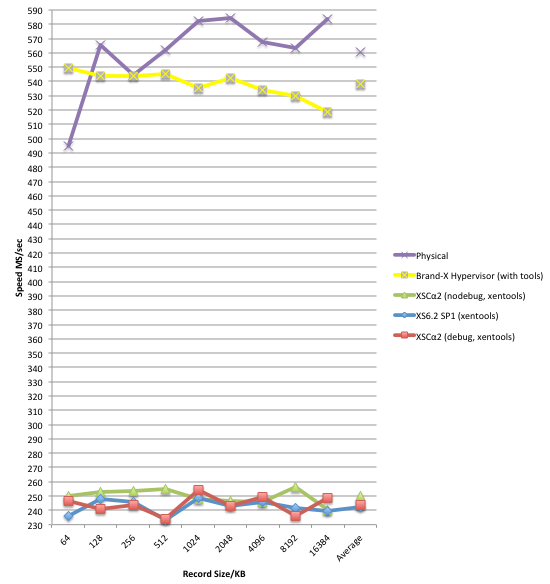
8GB Streaming Read At A Variety Of Record Sizes


On this system, for this test, XSCA2 is an improvement over XS61-SP1, but is still significantly behind the physical, and more disappointingly behind the other well known brand of Hypervisor. Besides the obvious, there are a few points from the chart which warrant further investigation for starters:
  • High jitter in all XS results.
  • Odd dip at the 512KB record size test on both XSCA2 and "Brand-X" hypervisor.
  • Slow start to the physical test at 64KB record size.
  The tests shown here were on a RAID0 of 3x 10Krpm spindles (maximum sustained transfer rate ~200MB/s each). Conducting the same test on a RAID0 of SSDs made little difference to the XenServer results, adding 20MB/s to the average write result and 40MB/s to the average read value.

Conclusions
  1. We aren't out of the performance tuning business just yet it seems!
  2. There is a significant difference in performance between the physical and "Brand-X" and XenServer.
  3. Read performance is particularly disappointing for XenServer in this test.

"It is easier to repair a bucket with a big hole, than an inner tube with a slow puncture." - Ancient 360is Engineer's Proverb.

For this system, for this test, the hole in the bucket is large, with a bit of further investigation it shouldn't be too hard to find. XenServer Dom0 (which strictly speaking we don't care about) comfortably achieves ~600MB/sec in read performance tested using "dd" with direct IO (no cache effect), so we know the problem is with the guest disk virtualisation IO path. First port of call will be instrumenting CPU consumption in the guest and Dom0, paying particular attention to XSCA2 susceptibility to numa-effects on the CPUs. We love a mystery. The game is afoot!


Further Information
Test VM Spec.
CentOS6 x86_64 Linux, default install from distribution, updated with "yum update" 3-07-2014, with the following additional packages: wget, openssh-clients, iozone (3.424-2 x86_64). 2 vCPUs, 1GB RAM, 20GB virtual hard disk.
Test Hardware Spec.
AMD 6176 CPUs (x2), 192GB 1066MHz RAM, LSI 9260-4i RAID, 3x WD1000DHTZ, 2x SSDSC2BW12.
Test Hardware OS.
CentOS6 x86_64 (same as VMs).
Brand-X Hypervisor.
Latest version, chose the PV SCSI device.

Benchmark.
We used the continuous benchmarking feature of VMCo Virtual Estate Manager (VEM). VEM's benchmarking alerts administrators to performance regressions in your XenServer or VMware estate, whether they be caused by bugs, patches, hardware problems, subtle interactions between network elements or administrator misconfiguration. VEM's continuous benchmarking shows you where the performance regression is, when it started, and it's impact is.


Tuesday, June 03, 2014

Disaster Recovery Rehearsals, A Guide To Avoiding Failure

SRA command 'testFailoverStart' failed for device '/vol/'
Who left the tap on?

How confident are you that if or when you need to enact your IT Disaster Recovery (DR) process, you will meet or exceed the expectations of management,  customers, and shareholders?

Someone, somewhere, is in the middle of a disaster right now. It happens to every day. Yet even though the price and effort-cost of providing DR has shrunk over the last 20 years, many organisations, even large and well-funded ones, continue to fail at DR. Perhaps part of the problem is the word disaster, we hear about disasters daily; typhoons, earthquakes, tsunami, reactor melt-down, pandemics, civil war. These things seem pretty remote to the inhabitants of London's Old Street or The City. What about a fire? Or a burst Victorian water pipe? Or perhaps a small construction accident? What about a malicious mouse click by an irked systems administrator? Most IT disasters do not make good candidates for Hollywood movies,  this doesn't mean they don't happen.

To download our guide to the 7 most common reasons for failure of DR exercises, skip down to the end of this posting.

360is consultants recently took part in a Disaster Recovery (DR) exercise for large London-based multi-national client. While nothing about the exercise was particularly new or remarkable, it serves as a reminder that even meticulously planned Disaster Recovery rehearsals can still hit snags on the day. We thought we'd share with you part of the briefing we gave to our client before the day of the test so that you and your organisation may be better prepared for those unforeseeable problems.


The Project Goals
  • Work through a failover of all applications, public network connections, and user remote access from the primary site to the DR site.
  • The end user's team to complete a battery of tests to determine the level of functionality at the DR site.
  • The entire exercise was to be conducted over the weekend, everything needs to be back to normal for monday morning.
  • As the client operates an international business working around-the-clock, real users need to be able to continue working on the primary site without any disturbance during the exercise.
  • At the end of the exercise the DR site workloads and data are to be destroyed, or rather reset to the previous position before the DR exercise began.

The Risk Factors
  • The client scheduled the test for the day of a major national event during which most major roads in London are closed.
  • 50% of previous rehearsals had problems which halted the exercise and caused it to be abandoned.
  • There was a tight time window given the number of workloads, acceptance testing, and the need to get everything back to the start positions for monday.
  • The technologies used were well known but complex, and not without their own quirks/bugs.
  • 360is ultimately had only 36 hours notice of the project and no prior involvement in building any of the infrastructure.
  • People from 3 organisations across 4 physical locations would be required to take part in the exercise.

The Outcome
While the client's data was never endangered, this project was a relatively high risk one given the factors above. Although minor snags were encountered during the test, these were quickly overcome using our specialist product knowledge and multi-vendor experience across the technologies involved. The total test duration was approximately 15 hours wall-clock time, with 1 out of 200 workloads failing to come up satisfactorily. The exercise was pronounced a success by the client.


So why was the exercise a success this time compared to previous failures?

Success Factors
There were 3 reasons why this exercise was a success this time around versus previous attempts.
  • Preparation
Through previous exercises, the team had carried out a relatively high degree of preparation. The order of events was well rehearsed (and documented) and everyone had a clear view of their own responsibilities. Checkpoints were established, estimations of how long each of the 20+ phases would take were relatively accurate.
  •  Automation
A high degree of automation was achieved using the virtualisation and storage platforms available. In fact the only significant snag was due to a small part of the replication process which someone had implemented manually long-ago, rather than leaving it up to the automated mechanism.
  • Availability of Expertise
No matter how well prepared you are every complex DR rehearsal will encounter some problems on the day. Whether it be a bug in software, an oversight in the procedure, or simply something that was not anticipated because full-scale testing was never done. When this happens there is no time to open a call with the vendor, or wade through Internet forums, or build a test rig, you need expertise in the room, on the phone, there and then. This is the area where 360is was able to intercede and directly influence the outcome of this project. Once a partial failure had been reported, we were able to provide our client with an explanation of what had gone wrong, why, what the significance was to the rest of the test, and what to do about it to prevent this becoming another aborted test.

360is Consultancy Engagement Profile

Duration:
  • 3-man days including preparatory project management meeting.

The Client:
  • A division of the one of the Big 4 audit firms, approximately 200 production workloads.

The Team:
  • Client: System Administrator, Project Manager, Offshore Application Testing Team, Programme Director.
  • Service Provider: Network, Security, Project Manager, System Administrator, not forgetting the NOC.
  • 360is: 1x Senior Consultant and 1x VMware Specialist.

The Technologies
  • NetApp (storage and replication)
  • VMware (Site Recovery Manager)
  • Juniper & Cisco (BGP routing & security)
  • Data centres operator facilities in east and west London

360is Guide To Avoiding Failure In Disaster Recovery
At some point or other we end up issuing the following guidance memo to all of our clients embarking on either building a DR infrastructure or conducting a DR rehearsal. It applies to all OS and application vendors, and all network or storage products, and while most of our clients are wholly or largely virtualised it also applies to non-virtual environments. To learn how to avoid the 7 most popular causes of failure in Disaster Recovery exercises, download the PDF [74KB].